What Is QBM (Quick Business Manager)? Features, Modules & Benefits
As businesses grow, managing accounting, inventory, sales, payroll, purchasing, customer information, and reporting across separate systems can become increasingly difficult.
An enterprise resource planning (ERP) system can help. QBM, or Quick Business Manager, is an integrated ERP and business management platform that brings finance and day-to-day operations together in one system. QBM combines accounting, inventory, sales, purchasing, tax and e-invoicing, POS, payroll, CRM, projects, manufacturing, reporting, and other business functions.
For businesses that want a centralized system rather than a collection of disconnected applications, QBM lets you manage different parts of the business while keeping information connected.
In this guide, we’ll explain what QBM is, what it can do, its main modules, who it is designed for, and how businesses can use it to improve financial and operational visibility.
What Is QBM?
QBM stands for Quick Business Manager.
QBM is an ERP and accounting platform developed by Business Aim that combines financial management and operational processes in a single business system.
Instead of managing accounting, inventory, sales, payroll, POS, and reporting separately, QBM connects these functions so transactions and information can flow between departments. The platform currently supports areas including:
- Accounting and banking
- Tax and e-invoicing
- Inventory and supply chain
- Sales and purchasing
- Point of sale (POS)
- Payroll and HR
- CRM and customer management
- Projects and jobs
- Manufacturing
- Reporting and analytics
- Business integrations
QBM is also available in different editions designed around different business requirements, from core business management to retail, POS, and larger multi-branch operations.
Why Do Businesses Use an ERP Like QBM?
One of the biggest challenges for growing businesses is fragmented information.
For example, a business might use:
- One system for accounting
- Another for inventory
- Spreadsheets for reporting
- Separate software for payroll
- A POS system for retail sales
- Another application for customer management
While these tools can work individually, connecting the information between them can create additional work. An integrated ERP takes a different approach.
Instead of keeping business information in separate silos, QBM connects financial and operational workflows within one platform. For example, a sales transaction can connect with inventory and financial records, while management reporting can use information from different areas of the business.
This gives owners and managers a more complete view of business activity.
What Can QBM Do?
QBM covers a broad range of business processes. Its main capabilities fall into several areas.
1. Accounting and Financial Management
Accounting is a core component of QBM. The platform supports financial workflows including:
- Chart of accounts
- Journal entries
- Bank reconciliation
- Cheques
- Budgets
- Cash flow
- Financial statements
- Audit reports
- Financial analysis
This allows finance teams to manage day-to-day accounting while giving management access to financial information and reporting.
For businesses that have outgrown basic bookkeeping software, having accounting connected to sales, purchasing, inventory, and other operational processes can provide a more complete picture of financial performance.
2. Tax and E-Invoicing
Tax and e-invoicing have become increasingly important areas for businesses operating in the UAE and other regulated markets.
QBM includes tax and e-invoicing functionality alongside its accounting and operational workflows. For UAE businesses, understanding the difference between traditional invoices and compliant electronic invoices is particularly important as the country’s e-invoicing framework develops. A PDF invoice is not necessarily considered an e-invoice under the UAE framework, so businesses should understand what qualifies as an electronic invoice and how the new requirements affect their existing invoicing processes.
This is particularly relevant for UAE businesses as they prepare for the country’s evolving e-invoicing requirements. The UAE’s e-invoicing framework uses a five-corner model that connects businesses, accredited service providers, the Federal Tax Authority, and other relevant parties.
Mobinweb’s existing UAE E-Invoicing Complete Guide 2026 and related e-invoicing content can also provide additional information.
3. Inventory and Supply Chain Management
Inventory management becomes more complicated as businesses add products, warehouses, branches, suppliers, and sales channels.
QBM includes inventory functionality for activities such as:
- Product and item management
- Stock transfers
- Physical inventory
- Multi-location inventory
- Barcodes
- Kardex tracking
- Landed costs
- Assemblies and kits
- Inventory costing
- Replenishment workflows
This allows businesses to connect inventory activity with purchasing and sales instead of maintaining separate stock records.
For trading, distribution, retail, and other inventory-heavy businesses, this can be particularly important.
4. Point of Sale (POS)
QBM also includes POS capabilities for businesses that sell directly to customers. Depending on the QBM edition and setup, POS workflows can include:
- Counter sales
- Receipt printing
- Held receipts
- Returns
- Payment processing
- Shifts
- Batch closing
- Loyalty
- Promotions
- Retail reporting
The advantage of connecting POS with an ERP is that sales activity can also feed into inventory and financial workflows. This makes QBM relevant not only to traditional office-based businesses, but also to retailers and other businesses with physical sales operations.
5. Payroll and HR
QBM also covers employee management. The platform includes functionality for:
- Employee records
- Payroll processing
- Payslips
- Attendance
- Leave management
- Time entry
- Employee analysis
Connecting payroll with the wider business system can reduce the need to maintain employee and payroll information in separate systems.
6. CRM and Sales Management
QBM is not limited to accounting. Its CRM and sales capabilities can be used to manage:
- Leads
- Opportunities
- Customer records
- Sales activities
- Quotes
- Invoices
- Receipts
- Customer follow-up
- Sales pipelines
This lets businesses connect customer and sales activity with their financial and operational information.
7. Projects and Jobs
For businesses that operate around projects, jobs, or field services, QBM provides functionality for areas such as:
- Job costing
- Project profitability
- Estimates
- Material requests
- Subcontractors
- Service activities
- Project tracking
This helps businesses monitor not only revenue but also the costs and profitability associated with individual projects.
8. Manufacturing
QBM also supports manufacturing-related operations. Depending on the edition and implementation, businesses can use QBM for areas such as:
- Assemblies
- Components
- Manufacturing workflows
- Inventory requirements
- Production-related costing
- Operational reporting
This extends QBM beyond basic accounting and into broader business operations.
9. Reporting and Business Intelligence
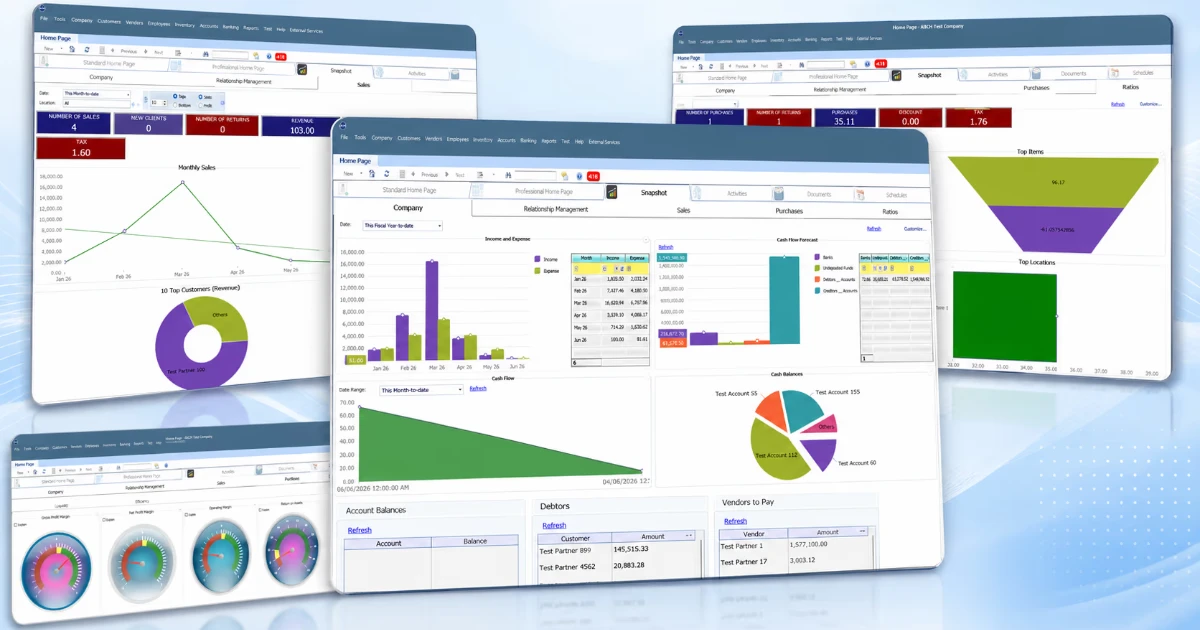
Having data in one system is only useful if managers can understand it. QBM includes 270+ built-in reports and reporting screens across areas including finance, sales, purchasing, inventory, customers, vendors, payroll, CRM, projects, and POS.
These reports can help management answer questions such as:
- How is the business performing?
- Which products are selling?
- What is the current inventory position?
- Which customers have outstanding balances?
- How are sales changing?
- What are the financial results?
- Which projects are profitable?
- Where are operational issues developing?
This is one of the main reasons an integrated ERP can be more useful than managing business information through disconnected spreadsheets and applications.
QBM Editions: Which Version Does a Business Need?
QBM is offered in several editions rather than using a single configuration for every business.
The current QBM platform lists:
- Standard
- Professional
- Premier
- Enterprise
- Retail
- POS
The appropriate edition depends on factors such as company size, number of users, locations, required modules, operational complexity, and industry.
For example, a business primarily looking for accounting, sales, purchasing, inventory, banking, tax, and reporting may have different requirements from a multi-branch business that needs advanced projects, manufacturing, CRM, or field-service functionality.
That is why ERP selection should start with the business workflow, not simply choosing the edition with the longest feature list.
Can QBM Be Used by Different Types of Businesses?
Yes. QBM supports different business models and operating environments. Its capabilities can be relevant to businesses involved in:
- Retail
- Trading and distribution
- Professional services
- Manufacturing
- Hospitality
- Project-based services
- Multi-location operations
The platform also supports multi-company, multi-currency, and multi-location operating models. The exact configuration and modules required will depend on the business.
QBMConnect: Extending QBM Beyond the Desktop
QBM’s ecosystem also includes QBMConnect, a collection of browser-based companion applications that give approved users access to specific QBM workflows.
Current QBMConnect applications include:
QSales
Designed for customer sales work through an approved browser.
QSalesView
Provides sales visibility for owners, managers, and supervisors, including sales totals, trends, customers, products, branches, and employees.
QPulse
Provides an executive view of areas such as cash flow, financial health, sales performance, receivables, inventory, purchasing, and management alerts.
QClock
Provides browser-based employee clock-in and clock-out functionality connected to QBM.
QBMConnect is not a replacement for QBM itself. It provides browser-based companion access to selected QBM workflows while the underlying company data remains under the customer’s control.
Internal link opportunity: Link “QBMConnect” to the QBMConnect apps page.
QBM Cloud or On-Premise?
Another consideration when selecting an ERP is deployment.
QBM supports cloud and on-premise deployment options, allowing businesses to consider their operational, infrastructure, security, and access requirements when deciding how to deploy the system.
The right choice depends on factors such as:
- IT infrastructure
- Remote access requirements
- Data-control requirements
- Business locations
- Support requirements
- Integration needs
An ERP implementation should consider not only the software itself, but also how the system fits into the company’s existing environment.
What Are the Benefits of Using QBM?
The main benefit of an integrated platform like QBM is connected business information.
Instead of treating accounting, sales, inventory, payroll, and other departments as completely separate functions, QBM brings them together within one business management platform.
This can help businesses:
Improve financial visibility
Connect accounting and operational transactions to financial reporting.
Reduce duplicated data entry
Connected workflows can reduce the need to manually transfer information between separate systems.
Improve inventory visibility
Sales, purchasing, and inventory information can work together.
Support better decision-making
Managers can use reports and dashboards to understand business performance.
Manage growing operations
Multi-company, multi-currency, and multi-location capabilities can support more complex operating structures.
Connect compliance with operations
Integrate tax and e-invoicing workflows with the wider financial system.
Is QBM Right for Your Business?
QBM may be worth considering if your business has reached the point where spreadsheets or disconnected applications are making it difficult to manage operations.
It may be particularly relevant if you need to connect:
Accounting + Inventory + Sales + POS + Payroll + CRM + Reporting
within one system. However, choosing an ERP should always start with your actual requirements.
Before selecting a system, consider:
- How many users will need access?
- How many companies or branches do you operate?
- Do you need inventory management?
- Do you operate physical retail locations?
- Do you need payroll?
- Do you need CRM or sales management?
- What tax and e-invoicing requirements apply to your business?
- Do you need project or manufacturing functionality?
- Do you require cloud or on-premise deployment?
- Which existing systems need integration or migration?
The answers can help determine which QBM edition and configuration is appropriate.
QBM and Mobinweb
Mobinweb works with QBM as part of its ERP and business technology solutions, helping businesses evaluate, implement, integrate, customize, and support business systems. Mobinweb currently lists QBM and Bitrix24 among the ERP/CRM platforms it works with.
This matters because implementing an ERP is more than installing software.
Businesses may also need support with:
- Requirements analysis
- System configuration
- Data migration
- Integration
- User training
- Workflow setup
- Customization
- Deployment
- Ongoing support
The goal is to make the software fit the way the business actually operates.
Final Thoughts
QBM, or Quick Business Manager, is more than accounting software. It is an integrated ERP and business management platform that brings together financial and operational processes, including accounting, inventory, sales, purchasing, tax, e-invoicing, POS, payroll, CRM, projects, manufacturing, and reporting.
For growing businesses, QBM’s value isn’t simply the number of features it offers. The bigger advantage is the ability to connect different parts of the business and give decision-makers a more complete view of what’s happening across the organization.
For UAE businesses in particular, QBM’s combination of accounting, tax, e-invoicing, inventory, sales, and reporting capabilities makes it a platform worth evaluating as part of a broader digital transformation strategy.
Looking to understand whether QBM is the right fit for your business? Mobinweb can help you evaluate your requirements, choose the appropriate setup, and plan implementation.