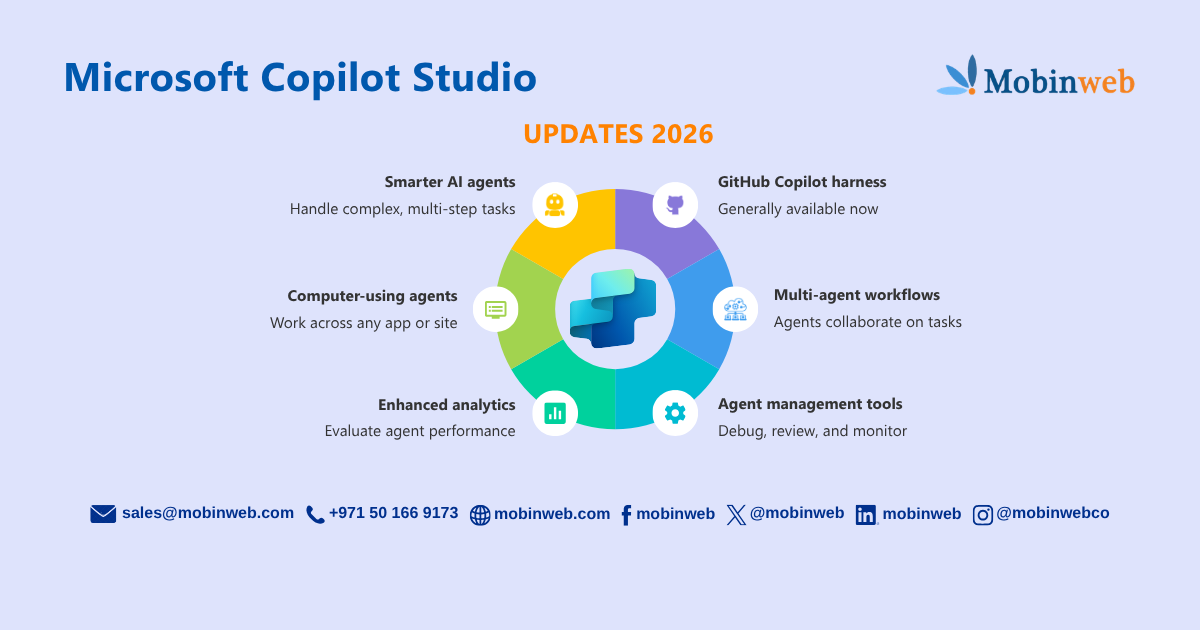
Microsoft Copilot Studio Updates You Should Know in 2026
Microsoft Copilot Studio is moving beyond simple chatbots. Recent updates are making it easier to build AI agents that can reason through complex tasks, work with multiple tools, automate business processes, and be evaluated and monitored at scale.
For businesses considering AI agents, these changes are important because Copilot Studio is increasingly focused on agents that can do work, not just answer questions.
Here are the key updates businesses should know.
What Is Microsoft Copilot Studio?
Microsoft Copilot Studio is Microsoft’s platform for building and managing AI agents and workflows.
Businesses can use it to create agents that interact with employees or customers, connect to business data, use tools, and automate processes.
Microsoft has been expanding Copilot Studio beyond traditional conversational bots. Its latest direction focuses on combining AI agents, workflows, integrations, and automation in a single environment.
1. Copilot Studio Is Built for More Complex AI Agents
One of the biggest changes in 2026 is the move toward agents that can handle more than straightforward conversations.
Microsoft’s new experience is designed around an enhanced orchestration system. Instead of manually defining every conversation path, users can describe what they want an agent to do in natural language, with the platform generating much of the underlying configuration.
This can make it easier to build agents for multi-step, decision-based processes.
For businesses, that could mean moving from: Customer asks a question → Agent answers to Customer request → Agent understands → Checks information → Uses a tool → Completes an action → Responds
That is a much more useful model for business automation.
2. GitHub Copilot Harness Is Now Generally Available
One of the most significant recent updates arrived in August 2026. Microsoft made the GitHub Copilot harness in Copilot Studio generally available, giving agents more capabilities for handling complex, long-running business processes.
The harness is designed to help agents work through tasks involving:
- Multiple steps
- Multiple information sources
- Ambiguous decisions
- Tools and workflows
- Other agents
- More complex reasoning
Microsoft says the harness can plan tasks, reason through problems, use skills, connect to workflows and external agents, and produce more complex outputs.
Why does this matter?
It means businesses can start thinking about AI agents as digital workers for specific processes, rather than simply website chatbots.
3. Copilot Studio Now Supports Different Agent Harnesses
Businesses don’t have to use the same type of agent for every situation. Microsoft currently describes three harnesses in Copilot Studio:
- Copilot Chat harness – designed for customized Copilot Chat experiences.
- Standard harness – suited to conversational agents and rules-based topics.
- GitHub Copilot harness – designed for more complex, agentic business processes.
This gives organizations more flexibility when deciding how an AI agent should operate.
A simple customer FAQ agent may not need the same capabilities as an agent handling a multi-step internal business process.
4. Agents and Workflows Can Work Together
Another important direction is the closer relationship between agents and workflows.
Traditional automation is useful when the steps are predictable: Invoice approved → Update record → Send notification
AI agents are more useful when the process requires interpretation or flexible decision-making. For example: Customer request → Agent understands the request → Checks information → Triggers workflow → Provides response
Microsoft’s new Copilot Studio experience lets businesses combine agents and workflows to automate processes end to end. This is particularly relevant for businesses looking to introduce AI into existing processes without completely replacing their current systems.
5. Computer-Using Agents Are Now Generally Available
Microsoft also announced the general availability of computer-using agents in Copilot Studio in May 2026. These agents are designed to interact with applications and websites in ways that resemble how a person uses a computer.
This can help when a business needs an agent to work with applications that don’t have a direct integration. Instead of requiring every system to have a dedicated API, computer-using agents can provide another way for AI to interact with software.
For businesses, this could open up automation opportunities across older or disconnected applications.
6. Agent Evaluation and Analytics Are Becoming More Important
Building an AI agent is only the first step. Businesses also need to know:
- Is the agent giving useful answers?
- Is it completing tasks correctly?
- Where is it failing?
- How often are users interacting with it?
- Is the agent actually improving the process?
Microsoft has continued adding evaluation and analytics capabilities to Copilot Studio. Recent updates include environment-wide analytics, custom metrics, agent evaluation, and more detailed agent performance reporting.
This is important for businesses because AI agents need to be measured like any other business system.
7. More Tools for Managing AI Agents
As companies deploy more agents, managing them becomes increasingly important.
Microsoft’s 2026 guidance updates include capabilities around the Agent Library, Agent Debugger, Agent Insights Hub, Power Shield, and Agent Review Pipeline as part of the evolving Copilot Agent Kit.
These tools aim to help organizations build, test, review, monitor, and manage agents more systematically. This matters especially for businesses planning to move from one experimental chatbot to multiple AI agents across departments.
8. Copilot Studio Is Moving Toward Multi-Agent Workflows
A single AI agent doesn’t always need to handle everything. Microsoft has also been expanding guidance around multi-agent orchestration, where different agents can work together to handle more complex tasks.
For example: Customer Agent → Sales Agent → Inventory Agent → Finance Agent
Each agent could have a specific role rather than forcing one agent to understand every part of the business. For larger organizations, this approach could make complex AI implementations easier to structure and manage.
What Do These Copilot Studio Updates Mean for Businesses?
The biggest change isn’t one individual feature. It’s the platform’s direction. Copilot Studio is moving from AI chatbots toward AI agents + workflows + tools + business systems.
That means businesses can look beyond simple customer-service chatbots and consider AI for processes such as:
- Customer support
- Sales qualification
- Employee assistance
- Document processing
- Research
- Internal knowledge
- Business workflows
- Data analysis
- Operational tasks
The right use case depends on the business and the systems already in place.
Should Your Business Use Microsoft Copilot Studio?
Copilot Studio can be a good fit if your business already uses Microsoft’s ecosystem and wants to introduce AI agents into existing workflows.
However, choosing an AI platform shouldn’t start with the technology.
Start with the problem.
Ask:
- What process takes too much manual time?
- What information does the process require?
- Which systems need to be connected?
- Does the process require human judgment?
- Would an AI agent or traditional automation be more appropriate?
Sometimes the answer will be an AI agent. Sometimes standard workflow automation is enough. In many cases, the best solution combines both.
How Mobinweb Can Help With AI Agents
AI implementation is not simply about creating a chatbot and putting it on a website. The real value comes from connecting the AI to the business process behind it.
Mobinweb helps businesses explore AI solutions such as process automation, chatbots and AI assistants, CRM enhancements, automated insights, custom integration, predictive analytics, and machine learning.
We can also build custom AI agents and chat assistants around a business’s specific requirements.
Our AI agent, Mobina, is an example of the type of conversational AI experience we can create for business use.
The goal is simple:
Find the right business problem, choose the right AI approach, and connect it to the systems and workflows that matter.
Frequently Asked Questions
What is Microsoft Copilot Studio used for?
Microsoft Copilot Studio is used to build and manage AI agents and workflows that can interact with users, access information, use tools, and automate business processes.
What is new in Copilot Studio in 2026?
Major developments include a redesigned agent experience, more advanced agent orchestration, the generally available GitHub Copilot harness, computer-using agents, improved analytics and evaluation capabilities, and expanded support for agent and workflow orchestration.
Can Copilot Studio agents automate business processes?
Yes. Microsoft is increasingly positioning Copilot Studio around combining AI agents and workflows to handle business processes, including more complex multi-step tasks.
Can Copilot Studio connect to business systems?
Yes. Copilot Studio supports tools, integrations, knowledge sources, and workflows that allow agents to work with business information and applications. The specific integration approach depends on the system and use case.
Are Copilot Studio agents only chatbots?
No. While conversational agents remain an important use case, Microsoft’s latest updates are increasingly focused on agents that can perform tasks, use tools, work with workflows, and handle more complex business processes.
Final Thoughts
Microsoft Copilot Studio is evolving quickly.
The platform is moving beyond simple conversational experiences toward AI agents that can reason, use tools, work with workflows, and complete more complex business tasks.
For businesses, the opportunity isn’t simply to add another chatbot.
It’s to identify where an AI agent can save time, improve customer experiences, or automate work—and then build it into the existing business process.
That’s where AI becomes a business tool rather than just another technology trend.